Receta: Cooking assistance and social connection application
Role
UX/UI
Designer
Approach
Goal-Directed Design
Duration
2 months
Medium
Food and home services

The Problem
Lack of user convenience
Problem Statement: The current state of cooking/recipe applications has focused primarily on cooking blogs. What existing products/services fail to address is convenience, ability to pull from different sources and the implementation of user social interaction. Our product/service will address this gap by providing a fun and unique user interface for cooks to connect, find inspiration, and create their own personalized recipe books through online sources.
Problem
01
A lack of user convenience, connection, and simplification of online recipe importation.
Impact
02
The user can spend too much time locating a proper recipe step-by-step step-to-do list, and can lack online peer-to-peer chef connections.
Solution
03
Receta - Every chef's one-stop destination for Online Recipe Importation, Social Connection, and meal planning.
Problem
01
A lack of user convenience, connection, and simplification of online recipe importation.
Impact
02
The user can spend too much time locating a proper recipe step-by-step step-to-do list, and can lack online peer-to-peer chef connections.
Solution
03
Receta - Every chef's one-stop destination for Online Recipe Importation, Social Connection, and meal planning.
Project Overview
What is Receta
Receta is an all-inclusive recipe import and organization prototype. Our application allows users to add recipes throguh online webpages other application with ease. In addition, their is a social forum which is utilized to allow users to connect with other chefs for culinary advice. The idea was pitch by our team leader Datsayna Medina at Kennesaw State University.
Persona Hypothesis
Hypothesis on user wants and goals
Beginner
01
New to cooking, little foundational knowledge
Building a relationship with cooking
Needs simple, basic features
Wants easy recipe import (camera, webpage, PDF)
Looks for basic/essential cooking tips
Intermediate
02
Has a solid structure around the kitchen, looking for more tips
Familiar with cooking fundamentals
Uses recipes as a guideline, not strict rules
Fine-tunes and strengthens skills
Seeks niche spaces and advanced recipes
Uses more customization tools
More expertise
More confident in cooking
Project Overview
What is Receta
Receta is an all-inclusive recipe import and organization prototype. Our application allows users to add recipes online or other application with ease. In addition, their is a social forum which is utilized to allow users to connect with other chefs for culinary advice. The idea was pitch by our team leader Datsayna Medina at Kennesaw State University.
Research Phase
Modeling and Requirements
User Research Interviews
Used a variety of chefs with various skill level
We used our persona hypothesis as a framework for who we would recruit. Since our application can be used by a variety of users we needed to replicate this in our interviews. We selected 5 participants with a variety of cooking skills from pure beginner to experienced expert. We noticed that the beginner's main claims were the need fo cooking help and the experts just need a way to organize and share ideas. However, it really wasn't until the experienced cooks had a goal of conveniently sharing recipes with others.
Affinity Mapping
Tracking our data and sorting
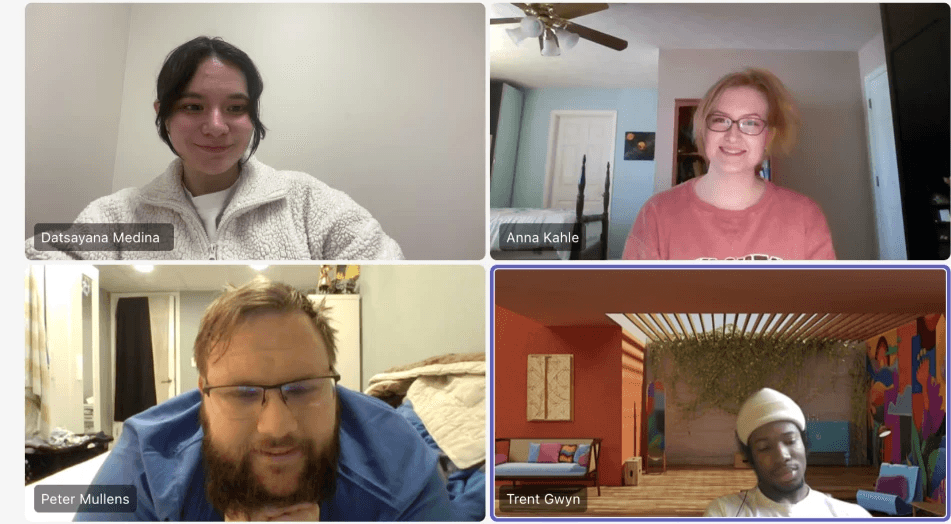
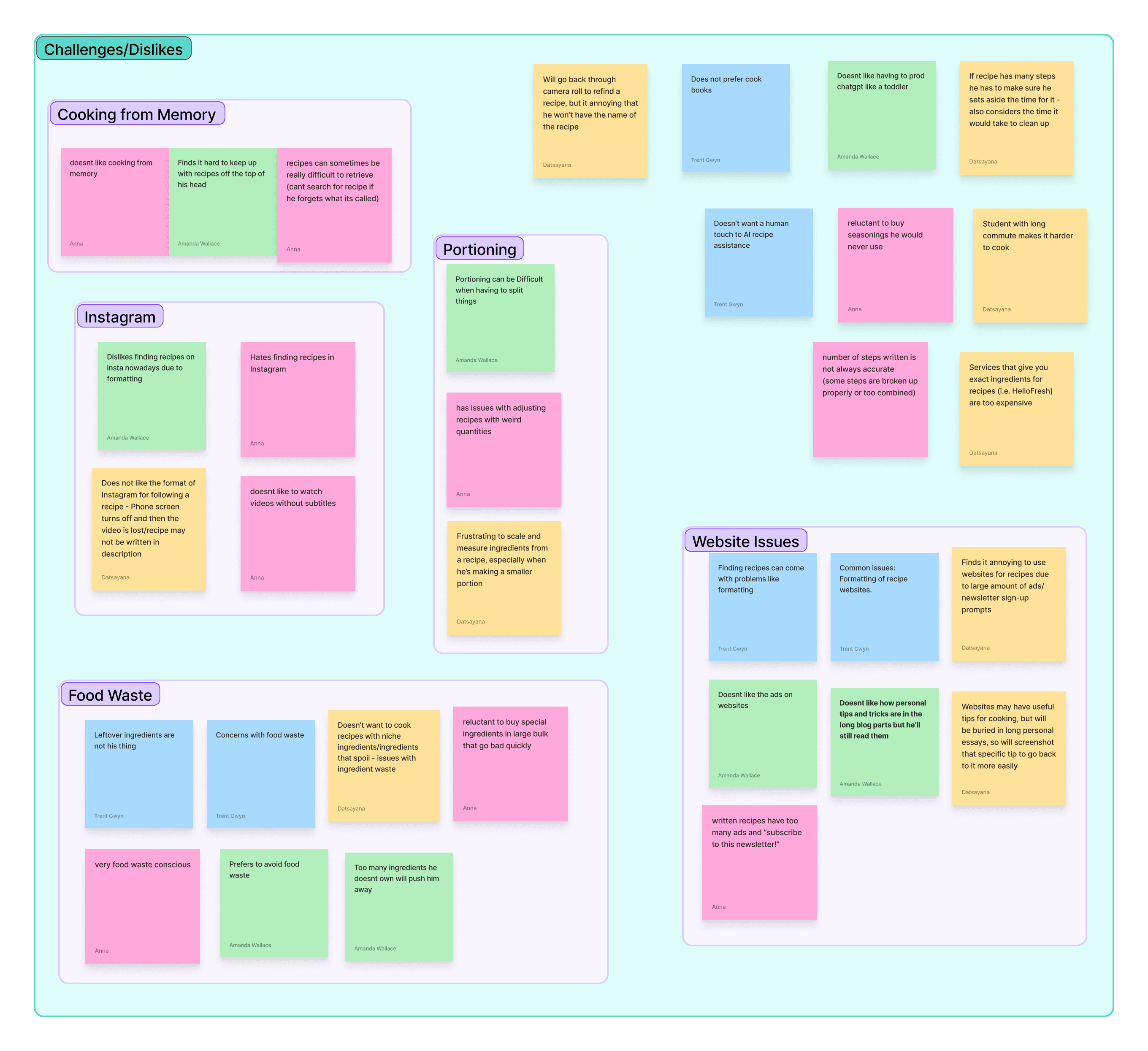
Within our interview process, we observed certain traits in our participants. Some were passionate about cooking other were just looking for an easy solution for their cooking routines. However, each person told a unique story. Based on each quality and trait we created affinity maps to map each interviewee's habits, information, challenges, wants, and needs. This data was utilized to form our user personas.
Personas
Laying our foundation
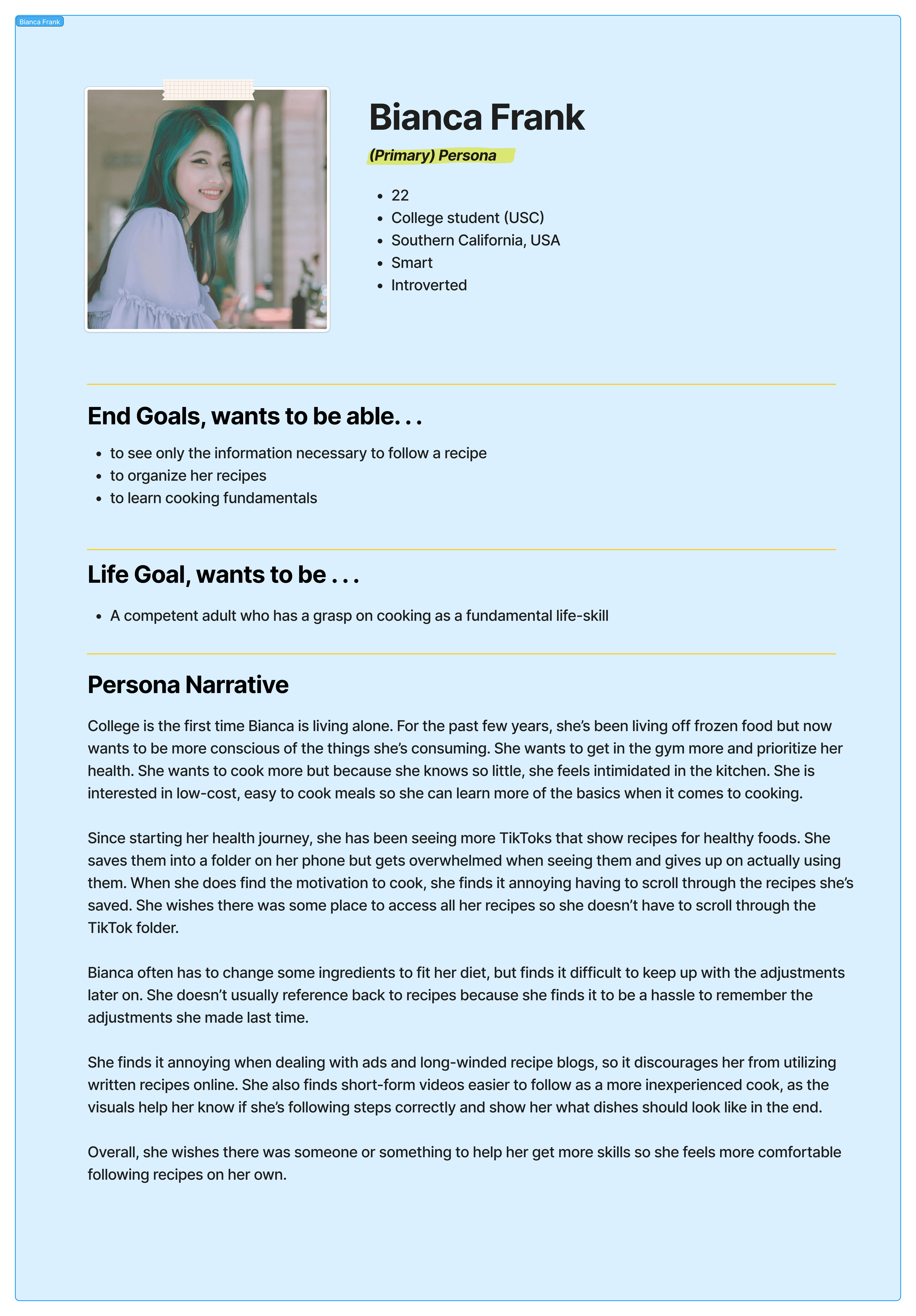
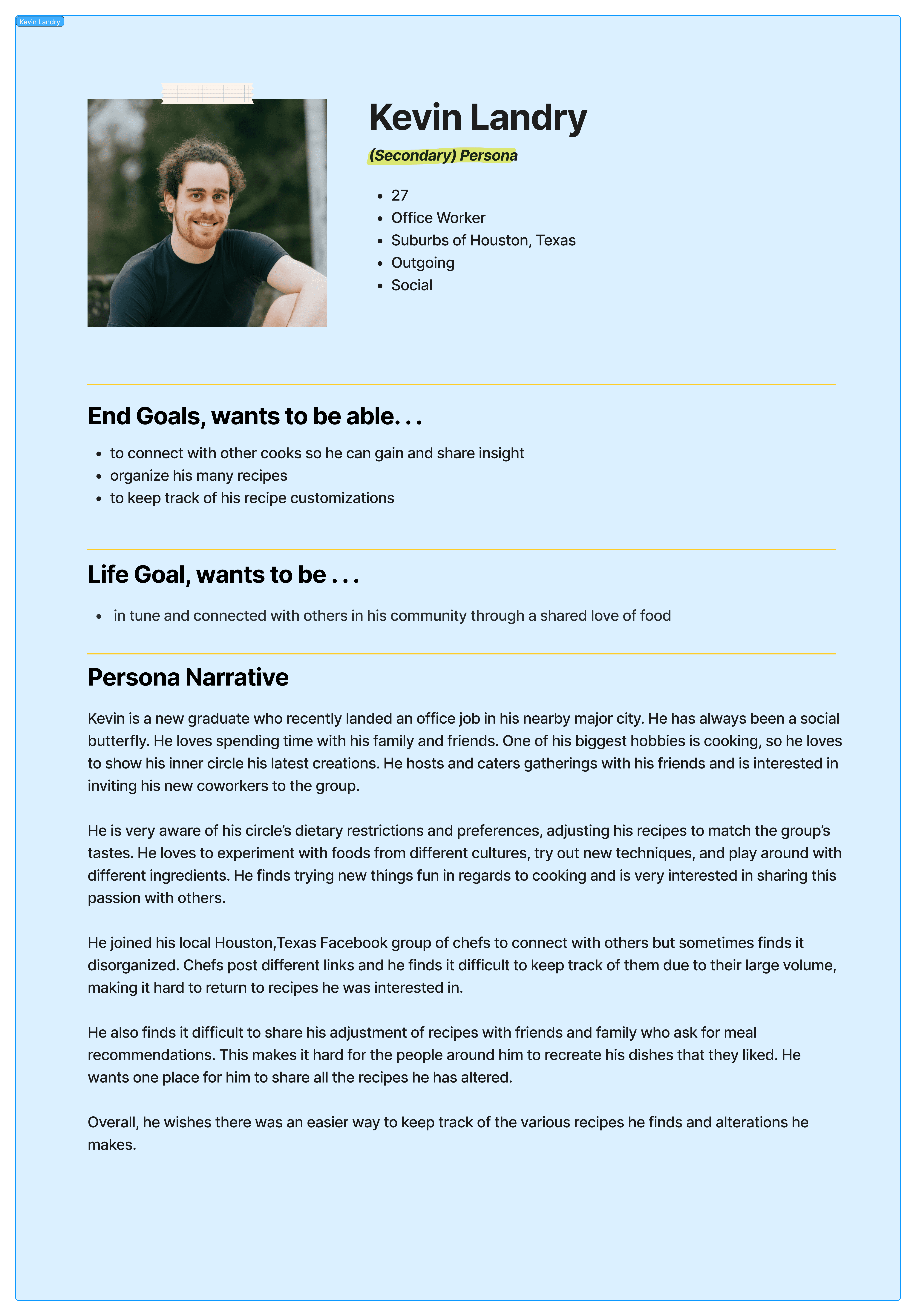
Here are our personas: Bianca Frank, our primary persona that represents the common user in our prototype. Bianca is a small college student that is looking towards utilizing Receta to teach her simple and easy cooking techniques to fit with her diet. Kevin Landry, our secondary persona, he represents a rather more social user that is more familiar within the kitchen. His goal is to utilize receta to learn from other chefs and connect with others in his community.
Personas
Laying our foundation
Here are our personas: Bianca Frank, our primary persona that represents the common user in our prototype. Bianca is a small college student that is looking towards utilizing Receta to teach her simple and easy cooking techniques to fit with her diet. Kevin Landry, our secondary persona, he represents a rather more social user that is more familiar within the kitchen. His goal is to utilize receta to learn from other chefs and connect with others in his community.
Observations
What did we discovered?
1. None of our participants were 100% confident in their cooking abilities 2. 3 out of 5 participants see cooking as a way of self pride 3. Each person values simplicity and organization 4. Each person is open to learning new things every day
Observations
What did we discovered?
1. None of our participants were 100% confident in their cooking abilities 2. 3 out of 5 participants see cooking as a way of self pride 3. Each person values simplicity and organization 4. Each person is open to learning new things every day
Persona Creation
Behavioral Variables and Curation
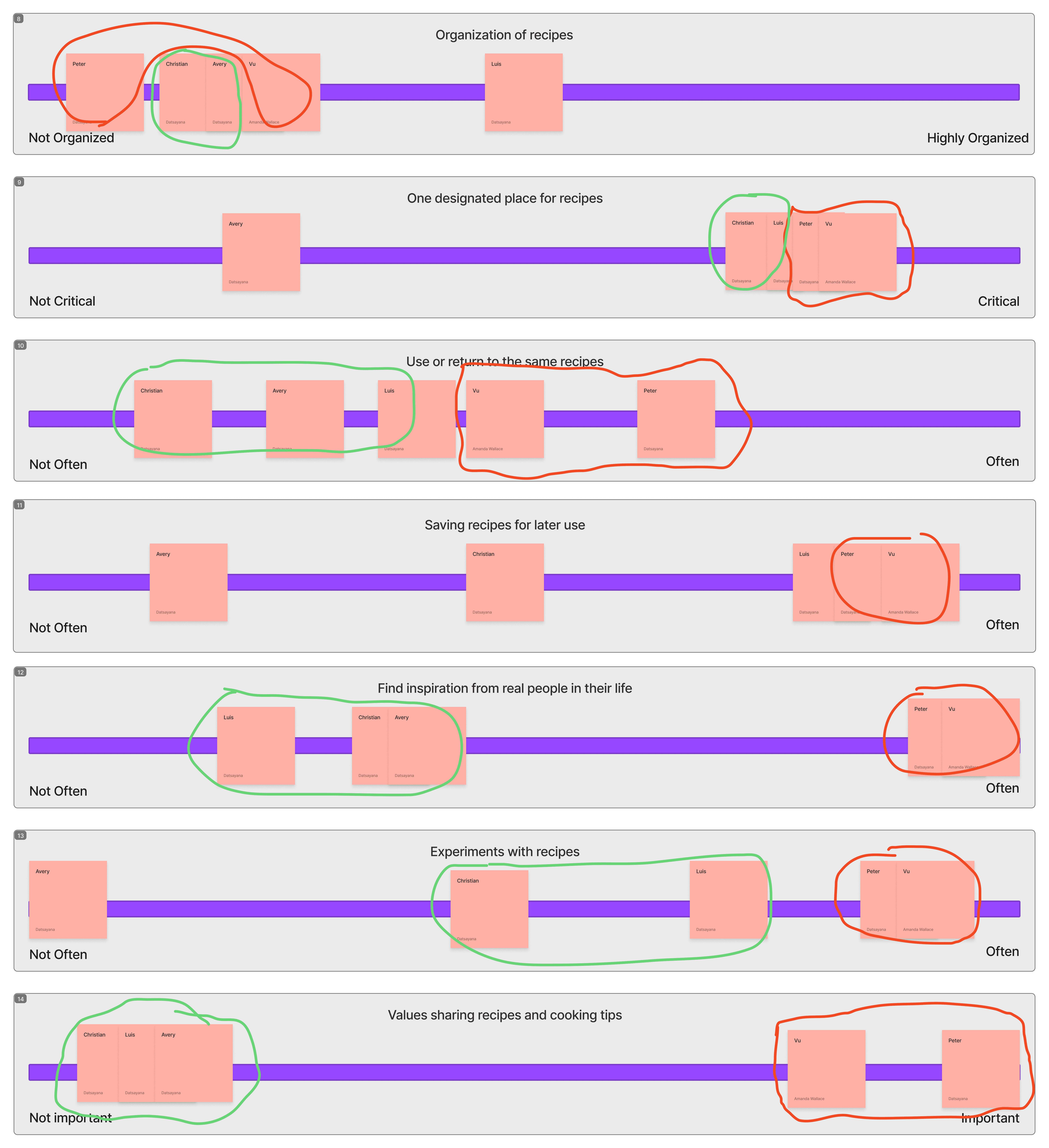
Based on our main observations, we developed behavior variables for each participant to find common use case patterns. These patterns were utilized to show and identify certain opinions on certain topics and goals. We discovered a strong and identifiable divisions between the beginner cooks vs the experienced cooks. Here we were able to determine that our prototype needed to enhance user freedom and social connectivity. Red represents experienced cooks while green is beginner
Personas
Laying our foundation
Personas
Laying our foundation
Our two personas:

Bianca's Journey
Bianca Frank’s Recipe Discovery Journey
Bianca is returning from a long college week and wants simple recipes she can add to her cooking routine. This map turns her expectations into a clearer product journey for Receta.
01 · Discovery
Emotion: tired but hopeful
Action: Looks for new recipes that fit her routine that are simple to understand online.
02 · Friction
Emotion: Slightly frustrated
Pain Point: Online sites have too much and limit her from finding key begineer steps and info.
03 · Solutioning
Emotion: Empowered
Action: Utlizes Receta's online link to recipe imporatation features to view key recipe steps.
04 · Implementation
Emotion: Hopeful
Result: Receta simplifies the online recipe information into key recipe steps and ingridents only.

Bianca's Journey
Kevin Landry's Recipe Discovery Journey
Bianca is returning from a long college week and wants simple recipes she can add to her cooking routine. This map turns her expectations into a clearer product journey for Receta.
01 · Discovery
Emotion: tired but hopeful
Action: Looks for new recipes that fit her routine that are simple to understand online.
02 · Friction
Emotion: Slightly frustrated
Pain Point: Online sites have too much and limit her from finding key begineer steps and info.
03 · Solutioning
Emotion: Empowered
Action: Utlizes Receta's online link to recipe imporatation features to view key recipe steps.
04 · Implementation
Emotion: Hopeful
Result: Receta simplifies the online recipe information into key recipe steps and ingridents only.
Bianca's Journey
Bianca Frank’s Recipe Discovery Journey
Bianca is returning from a long college week and wants simple recipes she can add to her cooking routine. This map turns her expectations into a clearer product journey for Receta.
01 · Discovery
Emotion: tired but hopeful
Action: Looks for new recipes that fit her routine that are simple to understand online.
02 · Friction
Emotion: Slightly frustrated
Pain Point: Online sites have too much and limit her from finding key begineer steps and info.
03 · Solutioning
Emotion: Empowered
Action: Utlizes Receta's online link to recipe imporatation features to view key recipe steps.
04 · Implementation
Emotion: Hopeful
Result: Receta simplifies the online recipe information into key recipe steps and ingridents only.
Kevin's Journey
Bianca Frank’s Recipe Discovery Journey
Kevin is at home looking to discover more chefs that he can connect with online to learn and share his recipes.
01 · Discovery
Emotion: Inspired. yet questionable
Action: Looks in his facebook groups for inspirations. He wants to diversifity his recipes to share with others.
02 · Friction
Emotion: Slightly frustrated
He is apart of many facebook groups, yet feels there is too much information to narrow down his taste.
03 · Solutioning
Emotion: Hopeful and inspired
Action: Utlizes Receta's online groups to find a group that is themed around dish he is looking to prepare.
04 · Implementation
Emotion: Confidence
Receta helps users discover the right groups for them in regards to any chef's needs or culinary desires.
Kevin's Journey
Bianca Frank’s Recipe Discovery Journey
Kevin is at home looking to discover more chefs that he can connect with online to learn and share his recipes.
01 · Discovery
Emotion: Inspired. yet questionable
Action: Looks in his facebook groups for inspirations. He wants to diversifity his recipes to share with others.
02 · Friction
Emotion: Slightly frustrated
He is apart of many facebook groups, yet feels there is too much information to narrow down his taste.
03 · Solutioning
Emotion: Hopeful and inspired
Action: Utlizes Receta's online groups to find a group that is themed around dish he is looking to prepare.
04 · Implementation
Emotion: Confidence
Receta helps users discover the right groups for them in regards to any chef's needs or culinary desires
Frameworks/Wireframing Phase
Designs
From Low to HI
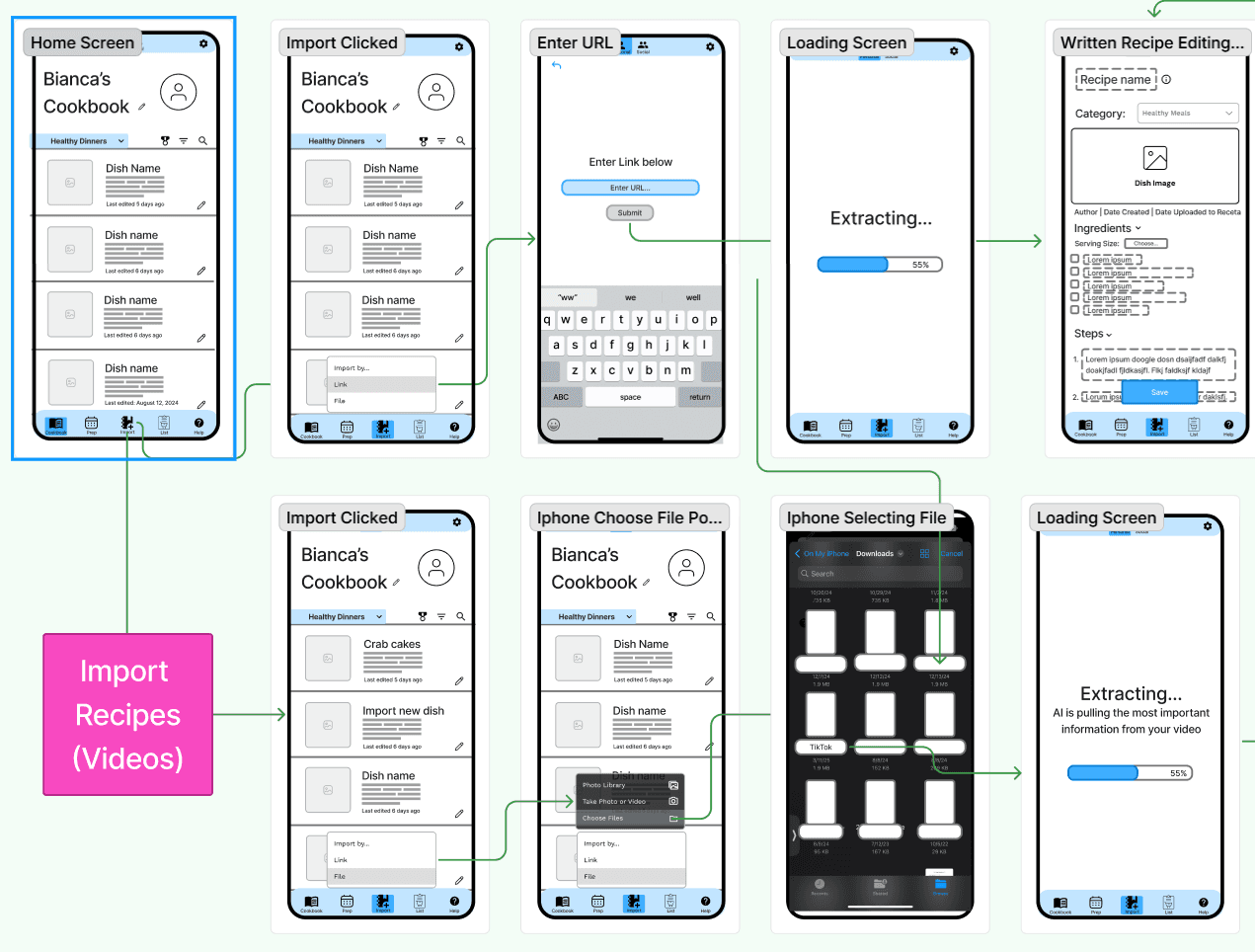
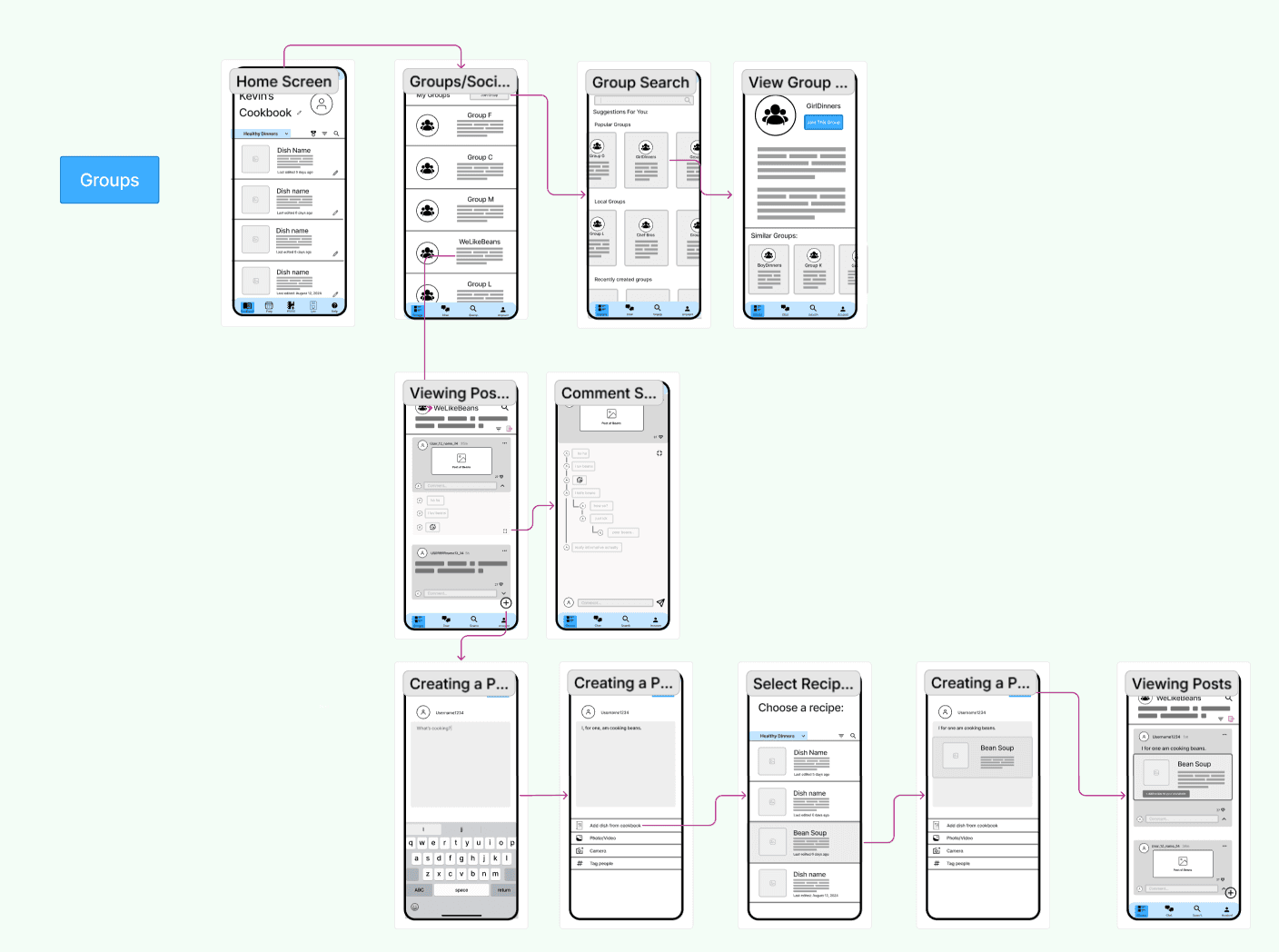
After our personas and requirements were established, it is time to move into bringing those goals and expectations to life. The team collectively utilized the Figjam cloud-based software to visualize and design key paths and validation scenarios for both user types. The validation path is labeled in magenta and the key path in green.
Prototyping
Energy goes where energy flows
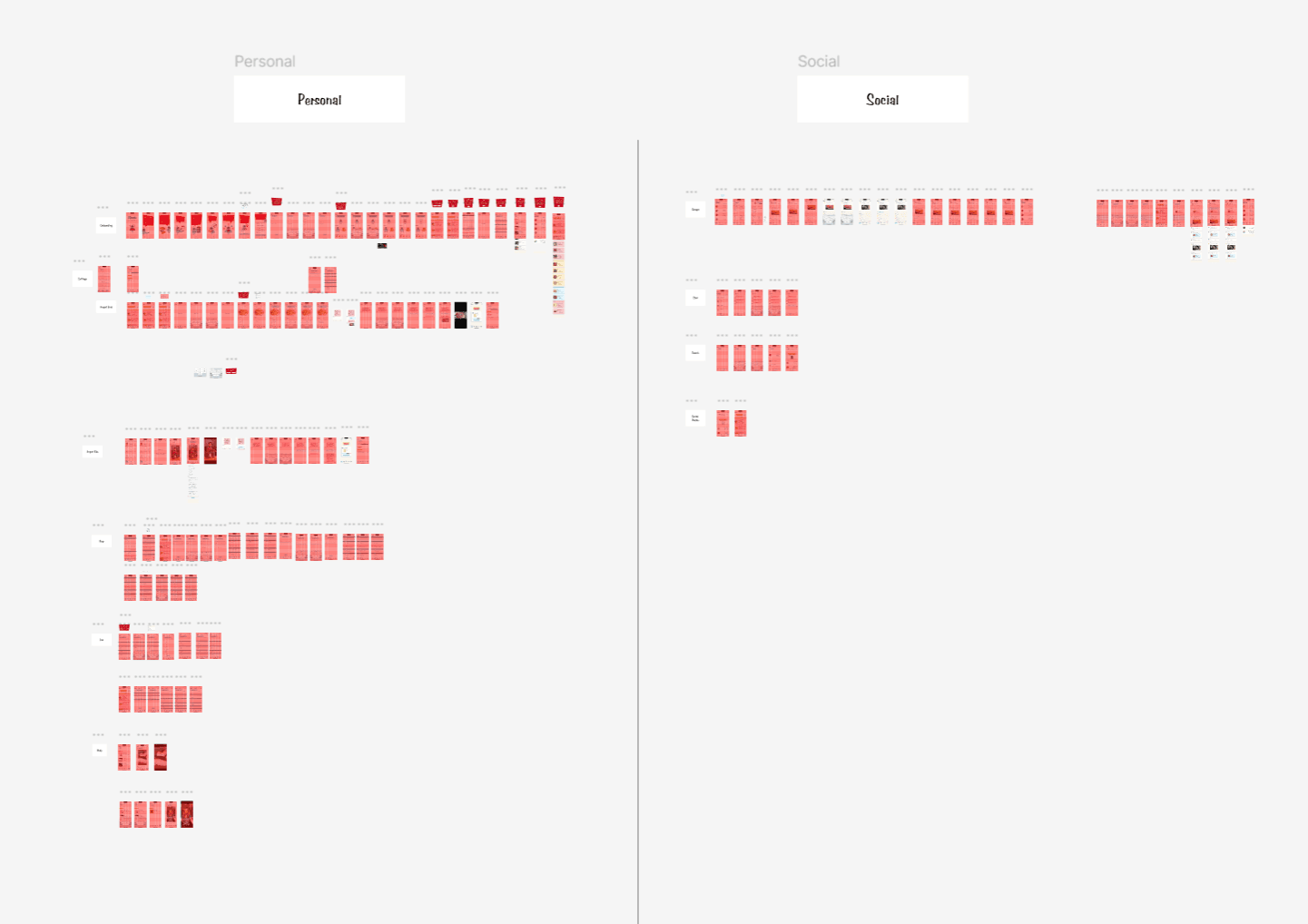
The sample above is not our full wireframe set. The full set is located on our Figjam. We based most of our designs from the wireframe above. Thus, we each delegated a task of each individual to create 12-15 screens in Hi-Fidelity. Utlizing a clean and simple aesthetic with a 50s color theme. In addition, we expanded on the use of an 8 pt grid for visual design to programming simplicity.
Usability Testing
Refining our flow and interactions based on past users
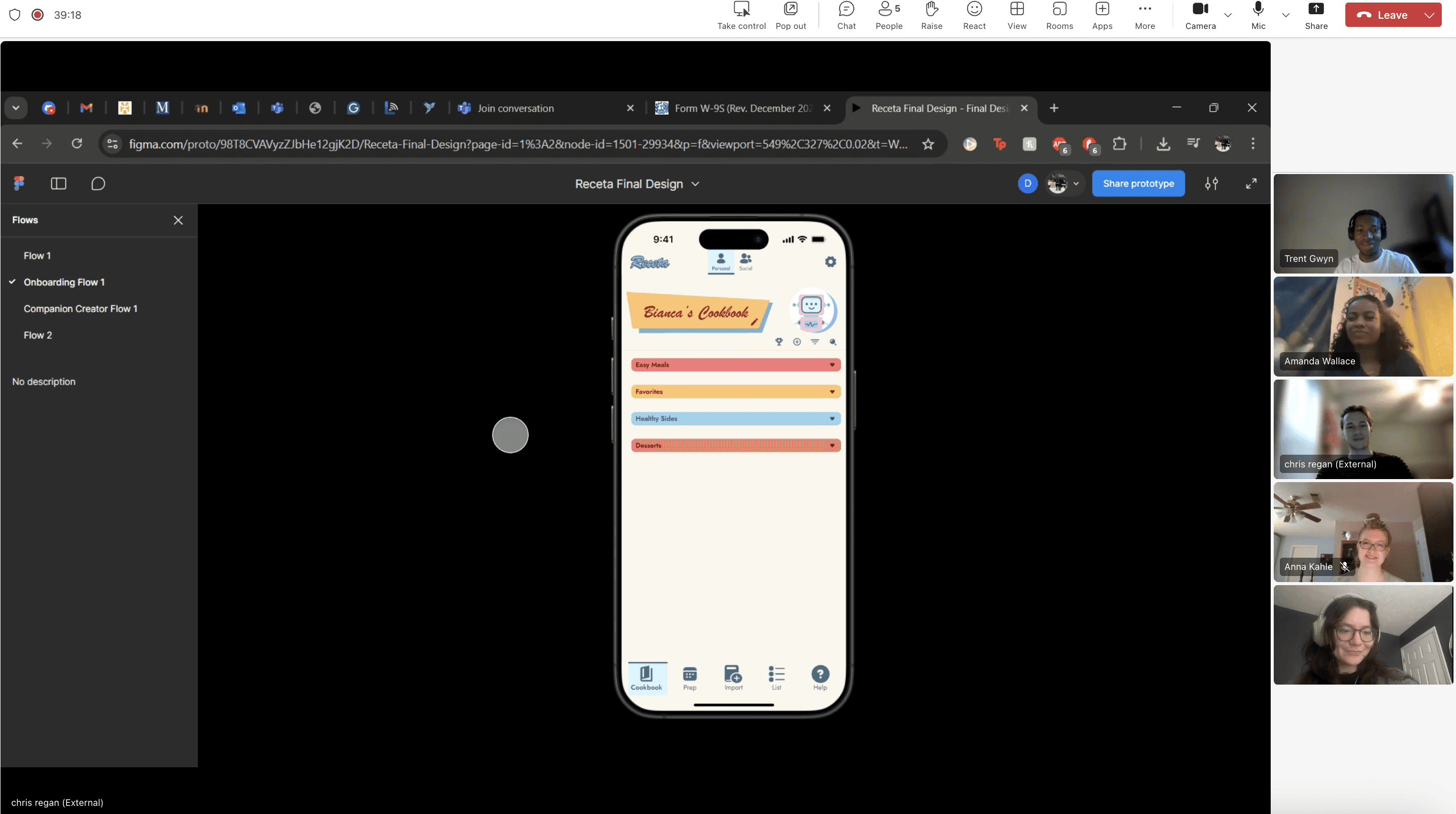
The designer is the one who fully knows the inside and outside of a prototype. However, we needed to see if our designs were simple to navigate and matched our users' goals. To gather evidence on how usable our application was, we conducted multiple usability tests with our past interviewees.
Final Iterations and flows
It all comes down to this
The designer is the one who fully knows the inside and outside of a prototype. However, we needed to see if our designs were simple to navigate and matched our users' goals. To gather evidence on how usable our application was, we conducted multiple usability tests with our past interviewees.
Cook Book Flow
The Main Key path
The main key path of adding a recipe to your cookbook via importing. This feature allows users to import, organize, and sort your recipes in one place. This feature enables the extra extraneous information on recipe webpages and Receta gives you the important information such as recipes and steps.
Social Group Chef Threads
What most recipe assistat apps lack
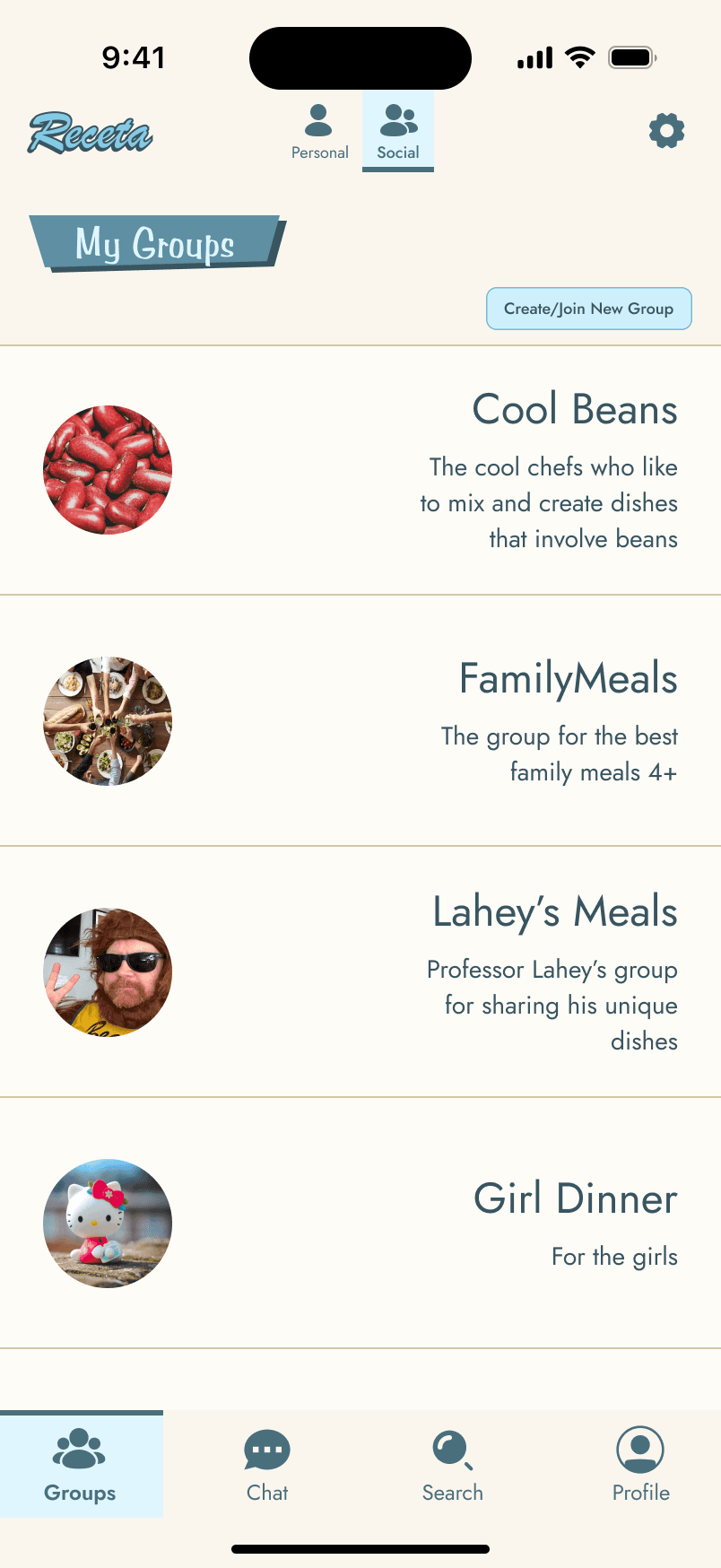
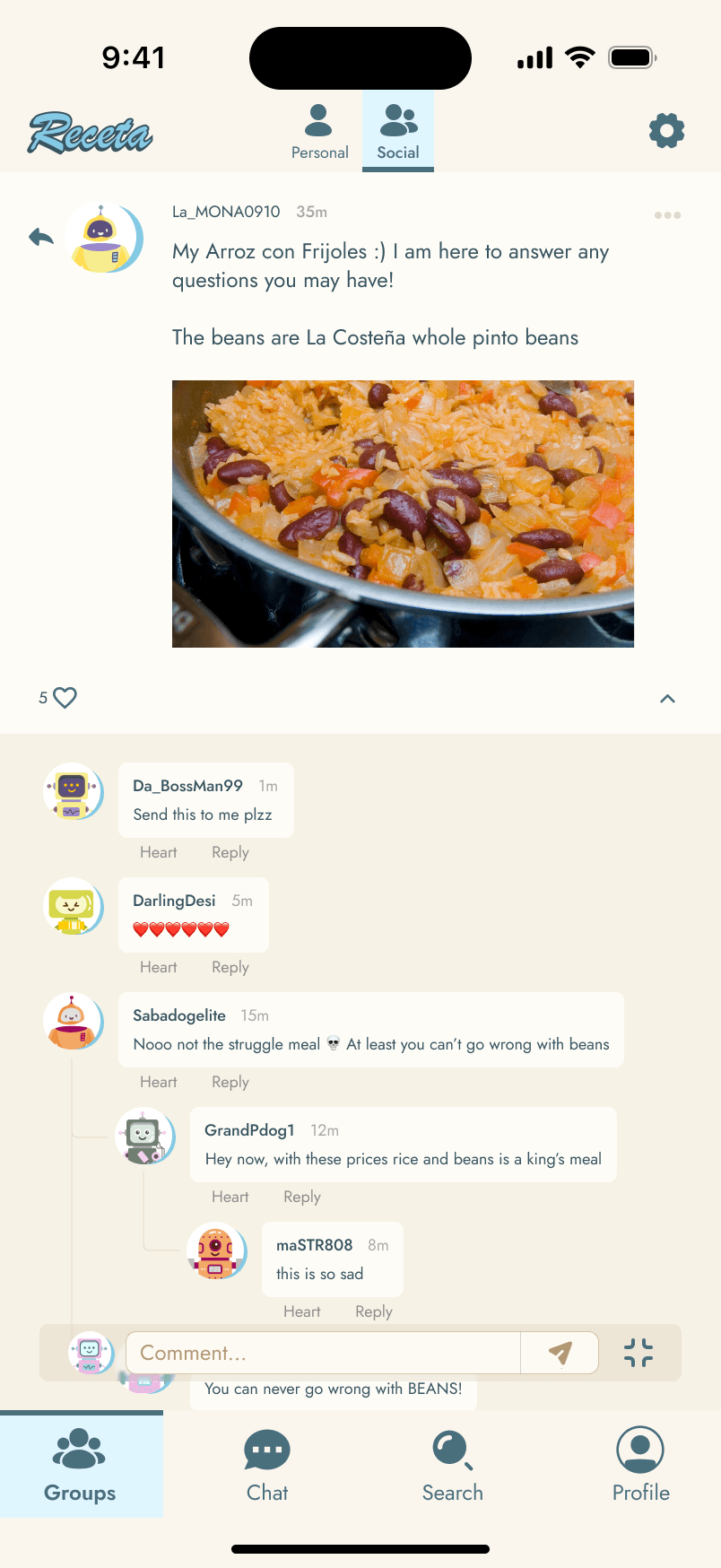
During our interviews multiple usersasked if they could have a feature to directly connect with other chefs for help. With Receta groups and chats such as this helps bridge the gap between chefs from all different experience levels.
AI chat bot feature
AI is moving fast
One of our team members suggested a live AI help feature for recipes. This was also suggested within our usability test. Thus, we went back to the drawing board add added a user friendly and easy to locate AI Receta help bot. However, we should have changed the AI graphic to make it look more distinguished


Final Prototype
Receta: Your Recipes, Your Way
From all our data collected from the market research, competitive audit, usability test, and other important metrics. We present to you Receta: The all-inclusive recipe organization and cooking assistant application. Disclamier: Still a working prototype
Final Prototype
Receta: Your Recipes, Your Way
From all our data collected from the market research, competitive audit, usability test, and other important metrics. We present to you Receta: The all-inclusive recipe organization and cooking assistant application. Disclamier: Still a working prototype
Final Reflection on the Project
Nothing is ever perfect, however everything requires progress
For my first time working with an IAD team I can say it was a great time. We all bonded on a great level and it was simple to generate ideas. In addition, our scheduling was great we did need to spend many hours on our designs, but it was worth it. From research, wireframing, and communicating it was a good flow. Lastly, I want to pay my respects to my team Datsayana Medina, Anna Kahle, and Amanda Wallace for guiding me and providing the help the team needed.
Lessons learned
Experiences teaches everyone
Things I learned for next time: 1. Time deligations are the most important thing 2. Universal components for UI is essential for consistency 3. Time management could have been better 4. Know the amount of work you are doing before starting the project 5. Keep user goals always in mind 6. UX may be important, however my sense on UI and color theory needs to improve
Copyright 2026 by Trenton Gwyn
Back to Top
Back to Top
Closing Remarks
Thank you for Navigating Receta
Receta was a great design foundation for my team and I and I want to show my upmost gratitude for everyone and you for taking the time to see our project. Thank you and live a great life.
Receta: Cooking assistance and social connection application
Role
UX/UI Designer
Approach
Goal-Directed Design
Duration
2 months
Medium
Food and home services
Project Overview
What is Receta
Receta is an all-inclusive recipe import and organization prototype. Our application allows users to add recipes throguh online webpages other application with ease. In addition, their is a social forum which is utilized to allow users to connect with other chefs for culinary advice. The idea was pitch by our team leader Datsayna Medina at Kennesaw State University.
Problem
01
A lack of user convenience, connection, and simplification of online recipe importation.
Impact
02
The user can spend too much time locating a proper recipe step-by-step step-to-do list, and can lack online peer-to-peer chef connections.
Solution
03
Receta - Every chef's one-stop destination for Online Recipe Importation, Social Connection, and meal planning.
The Problem
Lack of user convenience
Problem Statement: The current state of cooking/recipe applications has focused primarily on cooking blogs. What existing products/services fail to address is convenience, ability to pull from different sources and the implementation of user social interaction. Our product/service will address this gap by providing a fun and unique user interface for cooks to connect, find inspiration, and create their own personalized recipe books through online sources.
Persona Hypothesis
Hypothesis on user wants and goals
Beginner
01
New to cooking, little foundational knowledge
Building a relationship with cooking
Needs simple, basic features
Wants easy recipe import (camera, webpage, PDF)
Looks for basic/essential cooking tips
Intermediate
02
Has a solid structure around the kitchen, looking for more tips
Familiar with cooking fundamentals
Uses recipes as a guideline, not strict rules
Fine-tunes and strengthens skills
Seeks niche spaces and advanced recipes
Uses more customization tools
More expertise
More confident in cooking
Research Phase
User Research Interviews
Used a variety of chefs with various skill level
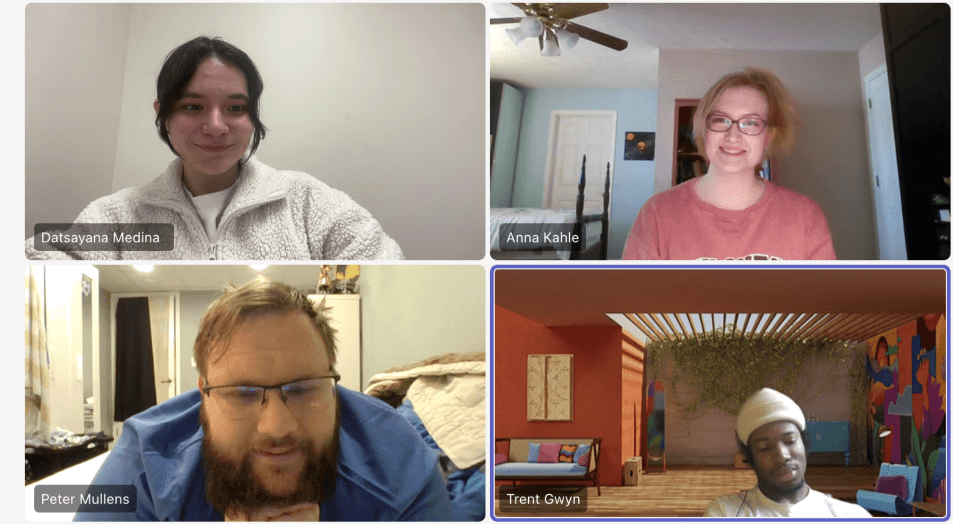
We used our persona hypothesis as a framework for who we would recruit. Since our application can be used by a variety of users we needed to replicate this in our interviews. We selected 5 participants with a variety of cooking skills from pure beginner to experienced expert. We noticed that the beginner's main claims were the need fo cooking help and the experts just need a way to organize and share ideas. However, it really wasn't until the experienced cooks had a goal of conveniently sharing recipes with others.
Persona Creation
Behavioral Variables and Curation
Based on our main observations, we developed behavior variables for each participant to find common use case patterns. These patterns were utilized to show and identify certain opinions on certain topics and goals. We discovered a strong and identifiable divisions between the beginner cooks vs the experienced cooks. Here we were able to determine that our prototype needed to enhance user freedom and social connectivity. Red represents experienced cooks while green is beginner
Observations
What did we discovered?
1. None of our participants were 100% confident in their cooking abilities 2. 3 out of 5 participants see cooking as a way of self pride 3. Each person values simplicity and organization 4. Each person is open to learning new things every day
Affinity Mapping
Tracking our data and sorting
Within our interview process, we observed certain traits in our participants. Some were passionate about cooking other were just looking for an easy solution for their cooking routines. However, each person told a unique story. Based on each quality and trait we created affinity maps to map each interviewee's habits, information, challenges, wants, and needs. This data was utilized to form our user personas.
Personas
Laying our foundation
Here are our personas: Bianca Frank, our primary persona that represents the common user in our prototype. Bianca is a small college student that is looking towards utilizing Receta to teach her simple and easy cooking techniques to fit with her diet. Kevin Landry, our secondary persona, he represents a rather more social user that is more familiar within the kitchen. His goal is to utilize receta to learn from other chefs and connect with others in his community.
Personas
Laying our foundation
Our two personas:
Bianca's Journey
Bianca Frank’s Recipe Discovery Journey
Bianca is returning from a long college week and wants simple recipes she can add to her cooking routine. This map turns her expectations into a clearer product journey for Receta.
01 · Discovery
Emotion: tired but hopeful
Action: Looks for new recipes that fit her routine that are simple to understand online.
02 · Friction
Emotion: Slightly frustrated
Pain Point: Online sites have too much and limit her from finding key begineer steps and info.
03 · Solutioning
Emotion: Empowered
Action: Utlizes Receta's online link to recipe imporatation features to view key recipe steps.
04 · Implementation
Emotion: Hopeful
Result: Receta simplifies the online recipe information into key recipe steps and ingridents only.
Kevin's Journey
Bianca Frank’s Recipe Discovery Journey
Kevin is at home looking to discover more chefs that he can connect with online to learn and share his recipes.
01 · Discovery
Emotion: Inspired. yet questionable
Action: Looks in his facebook groups for inspirations. He wants to diversifity his recipes to share with others.
02 · Friction
Emotion: Slightly frustrated
He is apart of many facebook groups, yet feels there is too much information to narrow down his taste.
03 · Solutioning
Emotion: Hopeful and inspired
Action: Utlizes Receta's online groups to find a group that is themed around dish he is looking to prepare.
04 · Implementation
Emotion: Confidence
Receta helps users discover the right groups for them in regards to any chef's needs or culinary desires
Frameworks/Wireframing Phase
Designs
From Low to HI
After our personas and requirements were established, it is time to move into bringing those goals and expectations to life. The team collectively utilized the Figjam cloud-based software to visualize and design key paths and validation scenarios for both user types. The validation path is labeled in magenta and the key path in green.
Prototyping
Energy goes where energy flows
The sample above is not our full wireframe set. The full set is located on our Figjam. We based most of our designs from the wireframe above. Thus, we each delegated a task of each individual to create 12-15 screens in Hi-Fidelity. Utlizing a clean and simple aesthetic with a 50s color theme. In addition, we expanded on the use of an 8 pt grid for visual design to programming simplicity.
Usability Testing
Refining our flow and interactions based on past users
The designer is the one who fully knows the inside and outside of a prototype. However, we needed to see if our designs were simple to navigate and matched our users' goals. To gather evidence on how usable our application was, we conducted multiple usability tests with our past interviewees.
Final Iterations and flows
It all comes down to this
The designer is the one who fully knows the inside and outside of a prototype. However, we needed to see if our designs were simple to navigate and matched our users' goals. To gather evidence on how usable our application was, we conducted multiple usability tests with our past interviewees.
Cook Book Flow
The Main Key path
The main key path of adding a recipe to your cookbook via importing. This feature allows users to import, organize, and sort your recipes in one place. This feature enables the extra extraneous information on recipe webpages and Receta gives you the important information such as recipes and steps.
Social Group Chef Threads
What most recipe assistat apps lack
During our interviews multiple usersasked if they could have a feature to directly connect with other chefs for help. With Receta groups and chats such as this helps bridge the gap between chefs from all different experience levels.
AI chat bot feature
AI is moving fast
One of our team members suggested a live AI help feature for recipes. This was also suggested within our usability test. Thus, we went back to the drawing board add added a user friendly and easy to locate AI Receta help bot. However, we should have changed the AI graphic to make it look more distinguished
Final Prototype
Receta: Your Recipes, Your Way
From all our data collected from the market research, competitive audit, usability test, and other important metrics. We present to you Receta: The all-inclusive recipe organization and cooking assistant application. Disclamier: Still a working prototype
Final Reflection on the Project
Nothing is ever perfect, however everything requires progress
For my first time working with an IAD team I can say it was a great time. We all bonded on a great level and it was simple to generate ideas. In addition, our scheduling was great we did need to spend many hours on our designs, but it was worth it. From research, wireframing, and communicating it was a good flow. Lastly, I want to pay my respects to my team Datsayana Medina, Anna Kahle, and Amanda Wallace for guiding me and providing the help the team needed.
Lessons learned
Experiences teaches everyone
Things I learned for next time: 1. Time deligations are the most important thing 2. Universal components for UI is essential for consistency 3. Time management could have been better 4. Know the amount of work you are doing before starting the project 5. Keep user goals always in mind 6. UX may be important, however my sense on UI and color theory needs to improve
Closing Remarks
Thank you for Navigating Receta
Receta was a great design foundation for my team and I and I want to show my upmost gratitude for everyone and you for taking the time to see our project. Thank you and live a great life.
Back to Top
Back to Top
Receta: Cooking assistance and social connection application
Role
UX/UI Designer
Approach
Goal-Directed Design
Duration
2 months
Medium
Food and home services
Project Overview
What is Receta
Receta is an all-inclusive recipe import and organization prototype. Our application allows users to add recipes throguh online webpages other application with ease. In addition, their is a social forum which is utilized to allow users to connect with other chefs for culinary advice. The idea was pitch by our team leader Datsayna Medina at Kennesaw State University.
Problem
01
A lack of user convenience, connection, and simplification of online recipe importation.
Impact
02
The user can spend too much time locating a proper recipe step-by-step step-to-do list, and can lack online peer-to-peer chef connections.
Solution
03
Receta - Every chef's one-stop destination for Online Recipe Importation, Social Connection, and Meal Planning.
The Problem
Lack of user convenience
Problem Statement: The current state of cooking/recipe applications has focused primarily on cooking blogs. What existing products/services fail to address is convenience, ability to pull from different sources and the implementation of user social interaction. Our product/service will address this gap by providing a fun and unique user interface for cooks to connect, find inspiration, and create their own personalized recipe books through online sources.
Persona Hypothesis
Who might our user be
Beginner
01
New to cooking, little foundational knowledge needs a little assistance.
Building a relationship with cooking
Needs simple, basic features
Wants easy recipe import (camera, webpage, PDF)
Looks for basic/essential cooking tips
Intermediate
02
Has a solid structure around the kitchen, looking for more tips.
Familiar with cooking fundamentals
Uses recipes as a guideline, not strict rules
Fine-tunes and strengthens skills
Seeks niche spaces and advanced recipes
Uses more customization tools
More expertise
More confident in cooking
Research Phase
User Research Interviews
Interviewed a variety of chefs with various skill levels
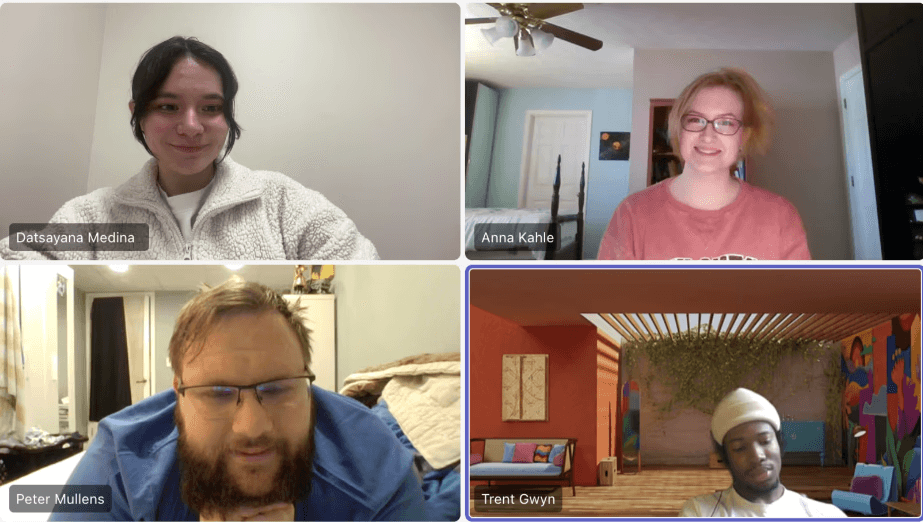
We used our persona hypothesis as a framework for who we would recruit. Since our application can be used by a variety of users we needed to replicate this in our interviews. We selected 5 participants with a variety of cooking skills, from pure beginner to experienced expert.
We noticed that the beginner's main claims were the need fo cooking help and the experts just need a way to organize and share ideas. However, it really wasn't until the experienced cooks had a goal of conveniently sharing recipes with others.
Affinity Mapping
Tracking our data and sorting
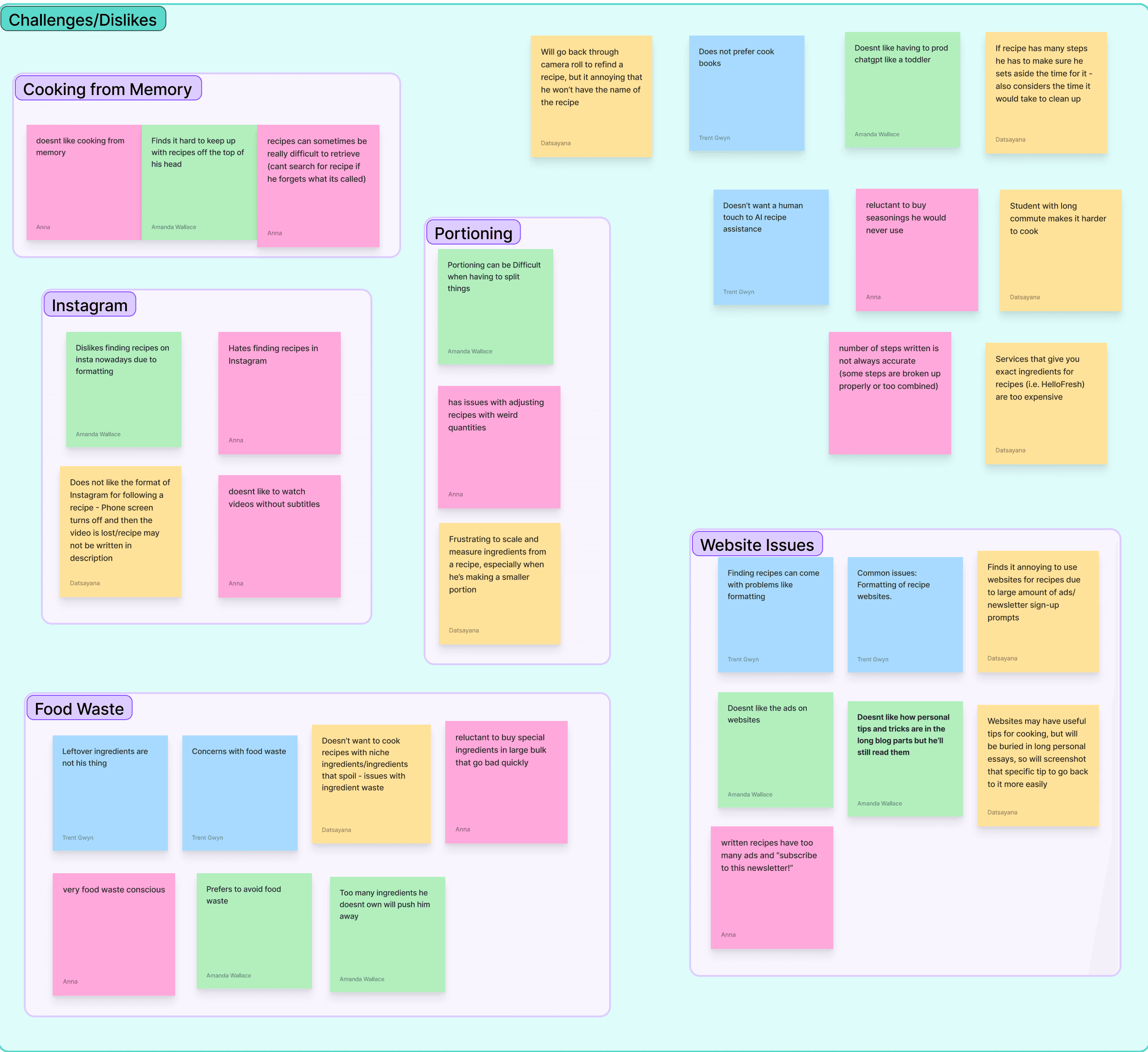
Within our interview process, we observed certain traits in our participants. Some were passionate about cooking other were just looking for an easy solution for their cooking routines. However, each person told a unique story. Based on each quality and trait we created affinity maps to map each interviewee's habits, information, challenges, wants, and needs. This data was utilized to form our user personas.
Observations
What did we discovered?
Not full confidence
01
None of our participants for fully 100% on their cooking abilities. Help and assistance was a catalyst.
Majority Prideful
02
3 out of 5 of our participants saw cooking as a way of self pride and self expression towards themselves.
The value of simplify
03
Each one of our users value key simplicity and organization within the discovery of recipes and cooking steps.
Open mindedless
04
Each user was open to learning new and different cooking techniques every day to expand their knowledge.
Modeling and Requirements
Persona Creation
Behavioral variables and curation
Based on our main observations, we developed behavior variables for each participant to find common use case patterns. These patterns were utilized to show and identify certain opinions on certain topics and goals.
We discovered a strong and identifiable divisions between the beginner cooks vs the experienced cooks. Here we were able to determine that our prototype needed to enhance user freedom and social connectivity. Red represents experienced cooks while green is for beginners.
Personas
Laying our foundation
Here are our personas: Bianca Frank, our primary persona that represents the common user in our prototype. Bianca is a small college student that is looking towards utilizing Receta to teach her simple and easy cooking techniques to fit with her diet. Kevin Landry, our secondary persona, he represents a rather more social user that is more familiar within the kitchen. His goal is to utilize receta to learn from other chefs and connect with others in his community.
Personas
Who are our ideal users?
Bianca's Journey
Bianca Frank’s Recipe Discovery Journey
Bianca is returning from a long college week and wants simple recipes she can add to her cooking routine. This map turns her expectations into a clearer product journey for Receta.
01 · Discovery
Emotion: tired but hopeful
Action: Looks for new recipes that fit her routine that are simple to understand online.
02 · Friction
Emotion: Slightly frustrated
Pain Point: Online sites have too much and limit her from finding key begineer steps and info.
03 · Solutioning
Emotion: Empowered
Action: Utlizes Receta's online link to recipe imporatation features to view key recipe steps.
04 · Implementation
Emotion: Hopeful
Result: Receta simplifies the online recipe information into key recipe steps and ingridents only.
Kevin's Journey
Bianca Frank’s Recipe Discovery Journey
Kevin is at home looking to discover more chefs that he can connect with online to learn and share his recipes.
01 · Discovery
Emotion: Inspired. yet questionable
Action: Looks in his facebook groups for inspirations. He wants to diversifity his recipes to share with others.
02 · Friction
Emotion: Slightly frustrated
He is apart of many facebook groups, yet feels there is too much information to narrow down his taste.
03 · Solutioning
Emotion: Hopeful and inspired
Action: Utlizes Receta's online groups to find a group that is themed around dish he is looking to prepare.
04 · Implementation
Emotion: Confidence
Receta helps users discover the right groups for them in regards to any chef's needs or culinary desires.
Frameworks/Wireframing Phase
Designs
From low to hI
After our personas and requirements were established, it is time to move into bringing those goals and expectations to life. The team collectively utilized the Figjam cloud-based software to visualize and design key paths and validation scenarios for both user types. The validation path is labeled in magenta and the key path in green.
Prototyping
Energy goes where energy flows
The sample above is not our full wireframe set. The full set is located on our Figjam. We based most of our designs from the wireframe above. Thus, we each delegated a task of each individual to create 12-15 screens in Hi-Fidelity. Utlizing a clean and simple aesthetic with a 50s color theme. In addition, we expanded on the use of an 8 pt grid for visual design to programming simplicity.
Design Features and Solutioning
Cook Book Flow
The Main Key path
The main key path of adding a recipe to your cookbook via importing. This feature allows users to import, organize, and sort your recipes in one place. This feature enables the extra extraneous information on recipe webpages and Receta gives you the important information such as recipes and steps.
Usability Testing
Refining our flow and interactions based on past users
The designer is the one who fully knows the inside and outside of a prototype. However, we needed to see if our designs were simple to navigate and matched our users' goals. To gather evidence on how usable our application was, we conducted multiple usability tests with our past interviewees.
Final Iterations and flows
It all comes down to this
After gathering our data from our usability test, we saw that our users had some issues with navigation. So we utilized our featured recordings of the test to see potential gaps in our designs and fixed and debugged them accordingly. Based on the participant's feedback and decisions we concluded with the following design iterations below.
Social Group Chef Threads
What most recipe assistat apps lack
During our interviews multiple usersasked if they could have a feature to directly connect with other chefs for help. With Receta groups and chats such as this helps bridge the gap between chefs from all different experience levels.
AI chat bot feature
Your handy chef assistant
One of our team members suggested a live AI help feature for recipes. This was also suggested within our usability test. Thus, we went back to the drawing board add added a user friendly and easy to locate AI Receta help bot. However, we should have changed the AI graphic to make it look more distinguished
Final Prototype
Receta: Your Recipes, Your Way
From all our data collected from the market research, competitive audit, usability test, and other important metrics. We present to you Receta: The all-inclusive recipe organization and cooking assistant application. Disclamier: Still a working prototype
Final Reflection on the Project
Nothing is ever perfect, however everything requires progress
For my first time working with an IAD team I can say it was a great time. We all bonded on a great level and it was simple to generate ideas. In addition, our scheduling was great we did need to spend many hours on our designs, but it was worth it. From research, wireframing, and communicating it was a good flow. Lastly, I want to pay my respects to my team Datsayana Medina, Anna Kahle, and Amanda Wallace for guiding me and providing the help the team needed.
Lessons learned
Design is experience
Things I learned for next time: 1. Time deligations are the most important thing 2. Universal components for UI is essential for consistency 3. Time management could have been better 4. Know the amount of work you are doing before starting the project 5. Keep user goals always in mind 6. UX may be important, however my sense on UI and color theory needs to improve
Closing Remarks
Thank you for navigating Receta
Receta was a great design foundation for my team and I and I want to show my upmost gratitude for everyone and you for taking the time to see our project. Thank you and live a great life.
Back to Top
Copyright 2026 by Trenton Gwyn
Copyright 2026 by Trenton Gwyn